Understanding Procedure, Process, Processor and Thread
Before we understand what multithreading is, lets first understand Procedure, Process, Processor and Thread:
- A procedure is a set of instructions (recipe).
- A process is the actual execution of those instructions (cooking).
- A processor is the part of the computer that does the execution (the chef).
Let’s say we write a program, which has raw instructions, then that program is called as procedure. And, we need an internal flow of execution to execute that program, that internal flow of execution is what we call process. These processes are maintained by OS, but are generated by the hardware component, these hardware components are called processors.
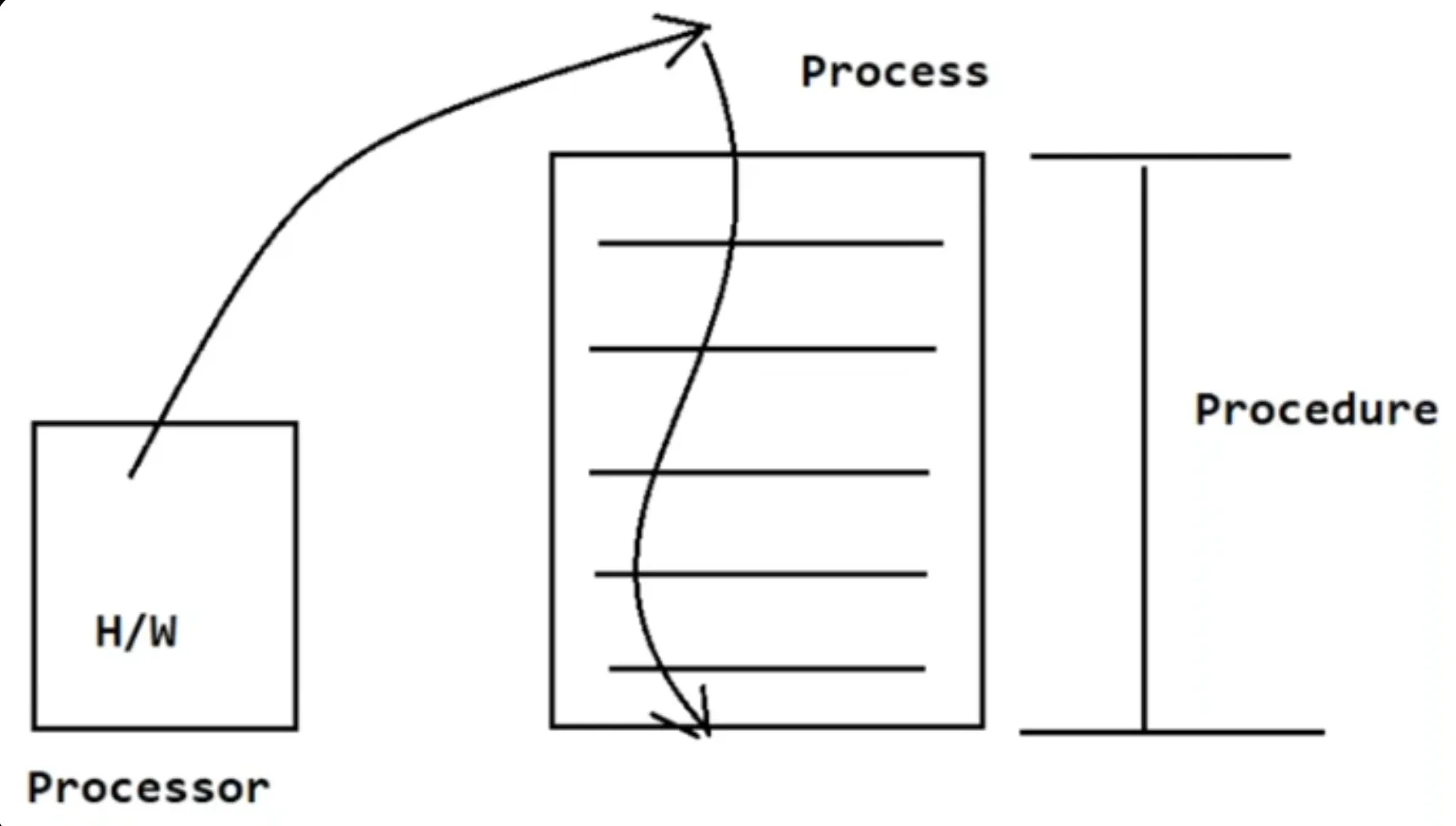
For example:
- An application / program on disk, flash memory is an static entity.
- An application / program in its running state - when it is brought in the main memory - is called a process
- This process may have multiple instances running, for example, a text editor, running one instance to read a document and another instance to make some notes.
What are Thread and Process then?
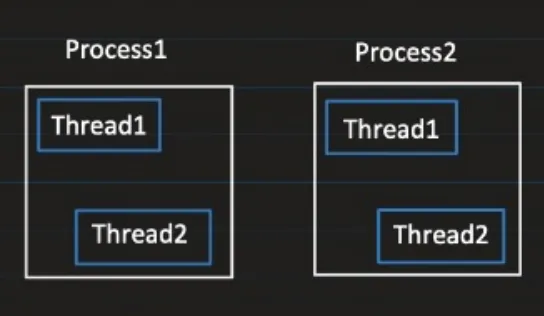
Process:
- It is an instance of a program that is being executed.
- It has its own resources like memory, threads, etc. The OS allocates these resources to the process when it’s created.
When we have a java file and we run javac Test.java then it goes into compilation and generates a bytecode file that can be executed by the JVM.
Next, when we run java Test, for the execution of bytecode file, then JVM starts a new Process for it.
Thread:
- Thread is known as a lightweight process
- It represents smallest sequence of instruction that are executed by the CPU independently.
When a process is spun up, it has a single thread, often called as the main thread which is responsible for execution of that Process. But, Process has the ability to generate multiple threads inside it. So 1 Process can have multiple threads which can be used to perform tasks concurrently.
public class Test {
    public static void main(String[] args) {
        System.out.println("Thread name: " + Thread.currentThread().getName());
    }
}
Output: Thread name: Main
Going a little in depth of Process and Thread
When we run java Test and then java Test2, the OS creates a separate process for each execution. Each process runs its own JVM instance, and each JVM has its own heap, method area (metaspace), stacks, and other memory areas. These processes are isolated and do not share memory by default.
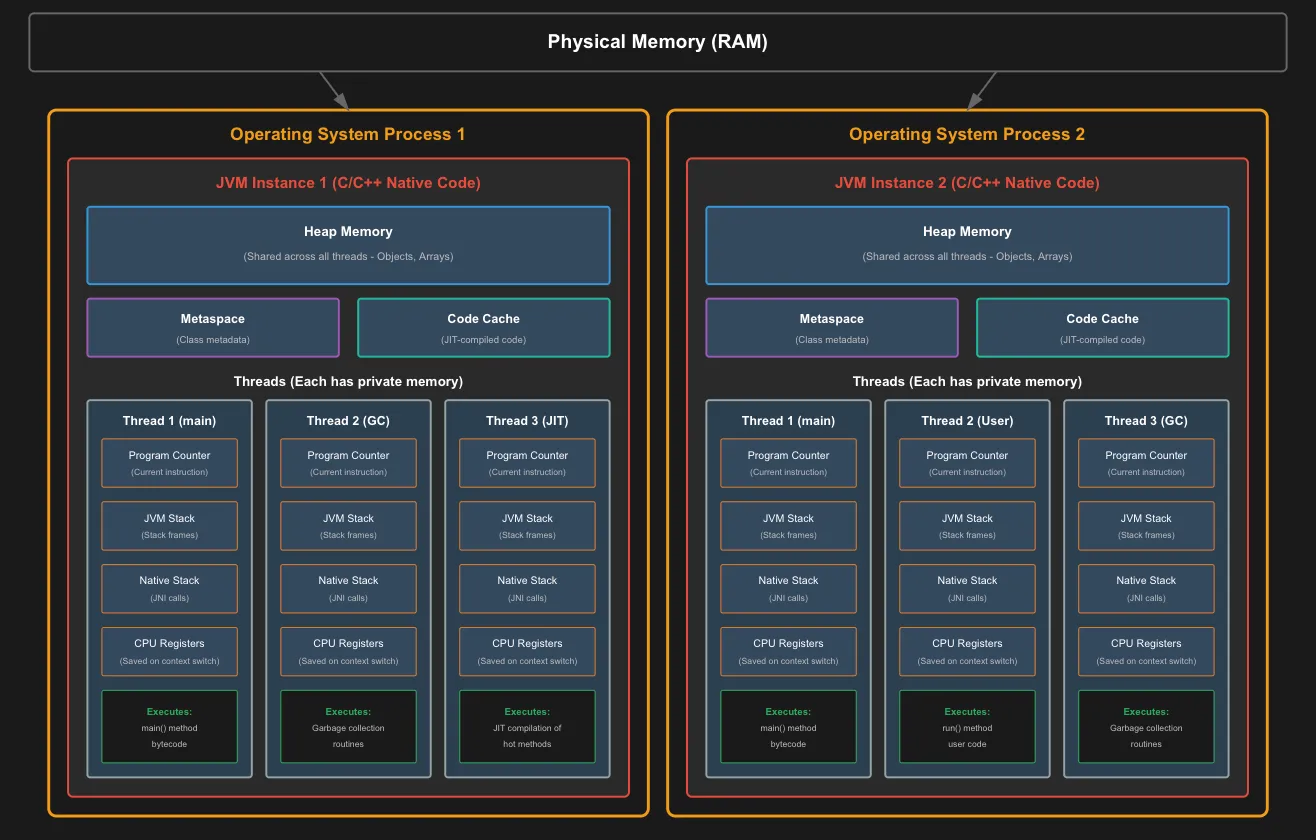
All these are managed by the JVM.
Metaspace Metaspace contains:
- Class metadata - Information about classes (methods, fields, access modifiers)
- Method bytecode - The actual bytecode instructions for each method
- Constant pool - String literals, numeric constants, class/method references
- Field data - Static variables and their values
Code Cache
- Code Cache = Performance optimization storage
- Contains CPU-specific instructions (not bytecode)
- Only hot methods get compiled and stored here
- Direct CPU execution - no interpretation needed
- Much faster than interpreting bytecode each time
Heap
- Objects created at runtime using
newkeyword are allocated space in heap. - Heap is shared among all the threads of the same process (but not within process)
- Threads can read and modify heap data
- Synchronization is required between multiple threads.
Stack
- Each thread has its own stack
- It manages method calls, local variables
CPU Registers
- When JIT compiler converts the bytecode into native machine code, it uses registers to optimize the generated machine code.
- Also helps in context switching.
- Each thread has its own registers.
Program Counter
- It points to the instruction which is getting executed.
- Increments its counter after successfull execution of instruction.
So the bytecode flow is:
.classfile on disk → Contains bytecode- ClassLoader loads it → Reads the
.classfile - Stored in Metaspace → Bytecode is kept here for the JVM’s lifetime
- Threads read from Metaspace → When executing a method, thread’s program counter points to bytecode in Metaspace
- Interpreter or JIT → Converts bytecode to machine code
- JIT-compiled code → Cached in Code Cache for fast re-execution
Important Distinction:
- Metaspace = Bytecode (original form, remains unchanged)
- Code Cache = Native machine code (JIT-compiled version of hot methods)
So when a thread executes a method: First time: Reads bytecode from Metaspace → Interpreter converts → Executes After JIT compilation: Directly executes from Code Cache (bypasses Metaspace)
How much memory does each process get?
While creating the process using java Test command, a new JVM instance will get created and we can specify how much heap memory it should be allocated by the following command: java -Xms256m -Xmx2g Test
Here -Xms<size> sets the initial heap size, above we generated 256MB. And -Xmx<size> will set the max heap size the process can have, above we set it to 2GB.
If it tries to allocate more than this max memory then we will get OutOfMemoryError.
Understanding Java Execution: From Source Code to CPU
When you compile a Java file using javac Test.java, the compiler converts your human-readable Java code into machine-independent bytecode stored in Test.class. This bytecode can run on any platform that has a JVM.
Launching the JVM
Running java Test creates a new operating system process with a JVM instance running inside it. The JVM itself is a program written in C/C++ and compiled to native machine code for your specific platform.
Memory Organization
Each JVM process manages several memory areas:
- Heap: Shared storage for all Java objects
- Metaspace: Stores class metadata and structure information
- Code segment: Contains the JVM’s native code and JIT-compiled methods
- Data segment: Holds global and static data
Each thread within the process has its own private:
- Stack: For method calls and local variables
- Program counter: Tracks the current instruction being executed
- Register set: CPU registers saved during context switches
Execution Flow:
When the JVM starts, it loads the bytecode and creates the main thread to execute the main() method. Initially, the interpreter converts bytecode instructions to machine code on-the-fly and executes them immediately on the CPU. As execution continues, the JIT (Just-In-Time) compiler monitors the code. When it detects frequently executed methods (hot spots), it compiles that bytecode into optimized native machine code and caches it. Subsequent calls to these methods execute the pre-compiled version directly, resulting in significantly faster performance.
Multithreading
The main thread executes the main() method sequentially. If your code creates additional threads (using new Thread().start()), each new thread executes its assigned code independently and concurrently. All threads within the JVM process share the heap memory and data segment, but maintain their own stacks and execution state. This concurrent execution across multiple threads enables parallel processing, improved performance, and responsive applications—the essence of multithreading in Java.
Definition of Multithreading
- Allows a program to perform multiple tasks at the same time.
- Multiple threads share the same resource such as memory space but still performs tasks independently.
Benefits and Challenges of Multithreading
Benefits:
- Improved performance by task parallelism
- Responsiveness
- Resource sharing
Challenges:
- Concurrency issues like deadlock, data inconsistency, etc.
- Synchronization overhead
- Testing and debugging is difficult