The collective information of a thread right from its starting point to ending point is called as “Thread Life Cycle”.
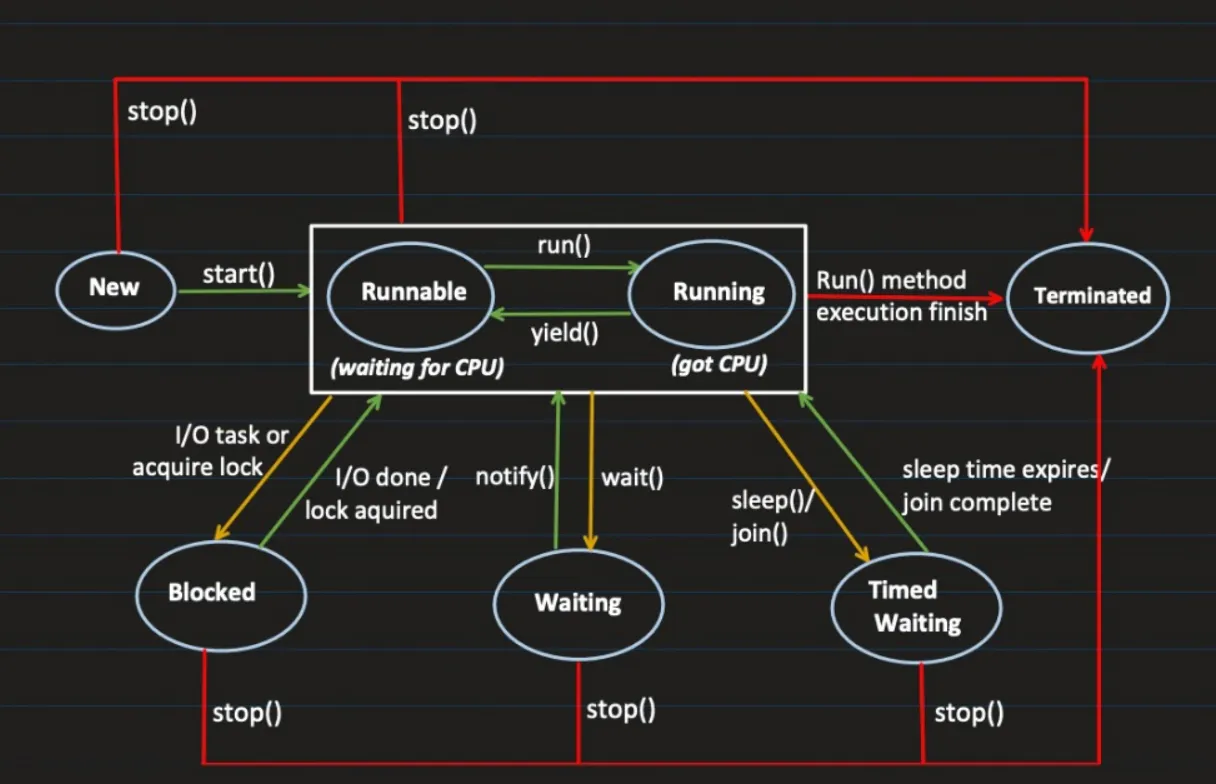
In Java applications, Threads can have the following states as part of their lifecycle:
More correct:
or more detailed:
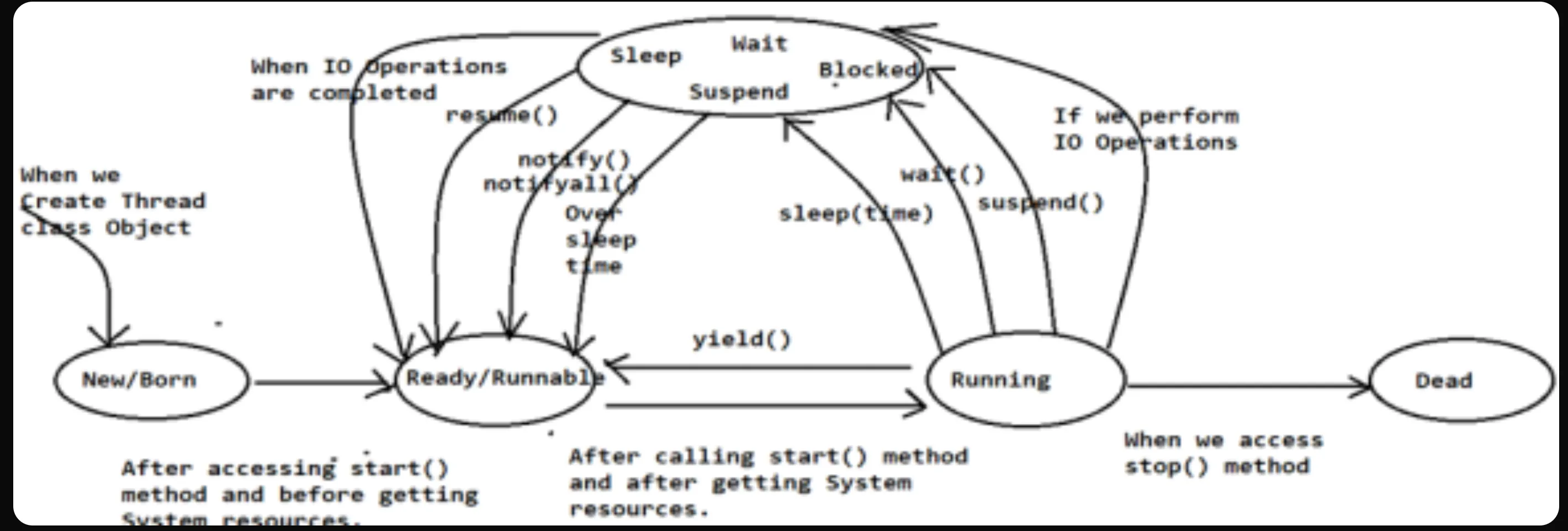
Lifecycle states:
New/Born State:
- When we create Thread class object in Java applications then Thread will come to New/Born state.
- Thread has been created but not started
- Its just an object in memory
Ready/Runnable State:
- When we access
start()method Thread Scheduler has to assign system resources like memory and time, here before assigning system resources and after callingstart()method is called as Ready/Runnable state. - Thread is ready to run, waiting for CPU time
Running State:
- In Java applications, after calling
start()method and after getting system resources like memory and execution time is called as “Running State”. - When thread starts executing its code
NOTE: We can send a thread from Running state to Ready state directly by accessing
yield()method, but, it is not supported by Windows operating system, because, it will perform its functionality on the basis of Threads priority values, priority based operations are not supported by windows operating system.
Dead / Destroy / Terminated State:
- In Java applications, when we access
stop()method over Running thread then that thread will come to Dead/Destroy state. - Life of a thread is complete, it cannot be started back again
stop() actually releases all locks and leads to ThreadDeathException (silent unchecked exception) which leaves objects held by the thread in an inconsistent state. This is why it’s deprecated.
Blocked State:
- When we perform IO Operations like reading from a file or database. Releases all monitor locks
- Lock acquired: If thread wants a lock on a resource which is locked by other thread, it has to wait
Waiting State:
- Thread goes into this state when we call
wait()method, makes it non-runnable. Releases all monitor locks - It goes back to runnable once we call
notify()ornotifyAll()method
Timed waiting state:
- Thread waits for specific period of time and comes back to runnable state after specific conditions meet like
sleep(),join() - Does not release any monitor lock
In Java applications, we are able to bring a thread from Blocked state to Ready / Runnable state in the following situations:
- When sleep time is over.
- If any other thread access
notify()/notifyAll()methods. - If any other thread access
resume()method. - When IO Operations are completed.
Understanding Monitor Locks
A monitor lock ensures that only one thread at a time executes a synchronized section of code on the same object.
Every Java object has an intrinsic monitor lock. When a thread enters a synchronized block or method, it attempts to acquire the lock of the object. If the lock is already held by another thread, the current thread enters the Blocked state. When the thread holding the lock exits the synchronized section, the monitor lock is released, allowing another waiting thread to acquire it.
Example: How Monitor Locks Work
class MonitorLockExample {
  synchronized void taskOne() {
    System.out.println(Thread.currentThread().getName() + " entered taskOne");
    try {
      Thread.sleep(10000); // Simulate long operation
    } catch (InterruptedException e) {
      e.printStackTrace();
    }
    System.out.println(Thread.currentThread().getName() + " completed taskOne");
  }


  void taskTwo() {
    System.out.println(Thread.currentThread().getName() + " before synchronized block in taskTwo");
    synchronized (this) {
      System.out.println(Thread.currentThread().getName() + " inside synchronized block of taskTwo");
    }
  }


  void taskThree() {
    System.out.println(Thread.currentThread().getName() + " executing taskThree (no lock)");
  }


  public static void main(String[] args) {
    MonitorLockExample obj = new MonitorLockExample();


    Thread t1 = new Thread(() -> obj.taskOne(), "Thread-1");
    Thread t2 = new Thread(() -> obj.taskTwo(), "Thread-2");
    Thread t3 = new Thread(() -> obj.taskThree(), "Thread-3");


    t1.start();
    t2.start();
    t3.start();
  }
}
🧠 What Happens Here:
- Thread-1 enters
taskOne()and acquires the monitor lock of obj. - Thread-2 attempts to enter the synchronized block in
taskTwo(), but must wait since obj’s lock is held by Thread-1. - Thread-3 executes freely since
taskThree()has no synchronization. - Once Thread-1 finishes, it releases the monitor lock, and Thread-2 acquires it.
Each object in Java maintains its own monitor lock. If two threads operate on different objects, they can both enter synchronized methods concurrently.
wait(), notify(), and notifyAll() — Thread Communication
Java provides these methods for inter-thread communication using monitor locks:
wait()→ Releases the monitor lock and waits until another thread callsnotify()ornotifyAll().notify()→ Wakes up one thread waiting on the object’s monitor.notifyAll()→ Wakes up all threads waiting on the object’s monitor.
When a thread is waiting (via wait()), it transitions to the WAITING state and releases its monitor lock. Once notified, it moves back to Runnable.